
Check your PowerPoint files for errors such as missing fonts, off-brand colors, size issues and broken links, then fix them with a few clicks.

Vendor
Neuxpower

Company Website

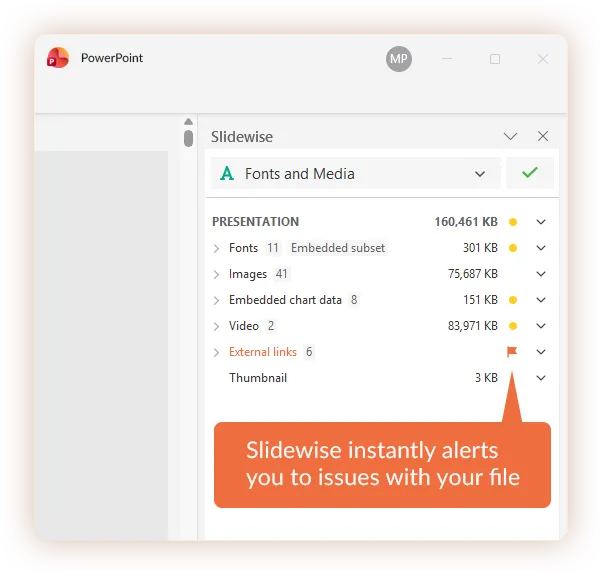
Clean up messy PowerPoint files fast with Slidewise!
Check your PowerPoint files for errors such as missing fonts, off-brand colors, size issues and broken links, then fix them with a few clicks.
Don’t let presentation problems ruin your day.
PowerPoint files can easily become messy over time. Errors creep in as presentations are worked on by different people or when content is pasted in with hidden baggage. They can be simple issues like oversized images, through to more subtle errors or inconsistencies such as incorrect fonts or colors. Many problems are difficult to spot just by eye. If you need to clean up an existing presentation, or combine multiple presentations together, you will most likely be familiar with these issues:
- Unwanted fonts
- Off-brand colors
- Too many slide masters
- Large file sizes
- Unevenly scaled images
- Broken links If quality assurance is important to you, then don't leave finding problems like these to chance! Slidewise warns you of potentially embarrassing or damaging errors, provides detailed information where you need it, and dramatically simplifies time-consuming, repetitive tasks. 👋 Say goodbye to presentation headaches – say hello to Slidewise! Your partner in clarity and control.
Early warnings
Slidewise's automated warnings make sure that presentation issues never take you by surprise.
Clear insight
Uncover the hidden details and true insights of your presentations—information you can't normally see using PowerPoint.
Simplify repetitive tasks
Make bulk changes to your presentation content and structure in seconds using Slidewise.