

Desktop software that converts PDF drawings into editable DXF files for use in CAD applications.

Vendor
Aide CAD Systems

Company Website
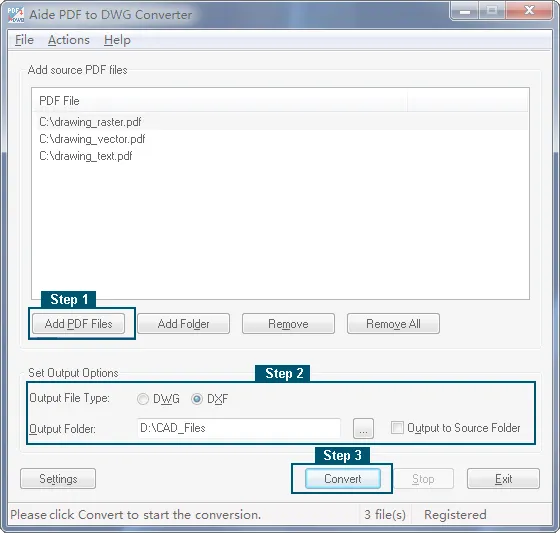
PDF to DXF Converter is a desktop software application designed to convert PDF files containing technical drawings into DXF format. The resulting DXF files can be opened and edited in standard CAD systems. The software focuses on extracting vector data, geometry, and structural elements from PDF documents and translating them into CAD entities. It is typically used in engineering, architecture, and technical documentation workflows where original CAD files are unavailable. The converter operates as a standalone application and does not require a CAD system to be installed. It supports batch processing and provides options to control how PDF content is interpreted and mapped to DXF elements.
Key Features
PDF to DXF Conversion
Converts PDF drawings into CAD format.
- Vector data extraction
- DXF output compatible with CAD software
Support for Vector and Raster Content
Handles different PDF structures.
- Recognition of vector elements
- Processing of scanned or raster‑based PDFs
Layer and Object Mapping
Organizes converted elements.
- Separation of geometry into layers
- Preservation of drawing structure
Batch Conversion
Processes multiple files efficiently.
- Conversion of multiple PDFs at once
- Reduced manual workload
Standalone Operation
Works independently of CAD systems.
- No CAD software required
- Dedicated conversion environment
User‑Controlled Conversion Settings
Allows adjustment of output behavior.
- Scaling and coordinate options
- Control over line types and elements
Benefits
Enables Reuse of Legacy Drawings
Recovers editable CAD data.
- Converts archived PDFs into DXF
- Reduces need for redrawing
Saves Time in CAD Preparation
Automates conversion tasks.
- Faster than manual tracing
- Batch processing support
Improves Workflow Compatibility
Supports standard CAD formats.
- DXF files usable in many CAD tools
- Easier integration into existing projects
Works Without Original CAD Files
Provides access to editable geometry.
- Useful when source files are missing
- Converts third‑party or received PDFs
Offers Control Over Output Quality
Improves conversion accuracy.
- Adjustable conversion parameters
- Better alignment with CAD standards